# メモ
DATA SaberっていうTableauのコミュニティがあるらしい
– Tableau イベントカレンダー
にあるように、Salesforce 自身がWebinarsでTableau 基礎 体験会をやってるらしい。
# チャートのメモ
Tableauで作れるチャート一覧 -全20種- (随時追加)
# とりあえずtableau public のページ作った。
## Tableauによる最強・最速のデータ可視化テクニック等で用いられているデータソースについて

# メモ
DATA SaberっていうTableauのコミュニティがあるらしい
– Tableau イベントカレンダー
にあるように、Salesforce 自身がWebinarsでTableau 基礎 体験会をやってるらしい。
# チャートのメモ
Tableauで作れるチャート一覧 -全20種- (随時追加)
# とりあえずtableau public のページ作った。
## Tableauによる最強・最速のデータ可視化テクニック等で用いられているデータソースについて

表題の通り、AWS Skill builder: Builder Labsが期間限定無料らしいです。
> ※ こちらの無料学習プランは 2025 年 11 月 2 日までの期間限定アクセスです。
メアドさえ登録できるので、AWSちょっと触ってみたいタイミングの人におすすめです。
3. Introduction to Amazon EC2 (日本語): このラボでは、Amazon EC2 インスタンスの起動、サイズ変更、管理、モニタリングの概要を学習します。Amazon Elastic Compute Cloud (Amazon EC2) は、クラウド内でコンピューティング性能を変更できるウェブサービスです。Amazon EC2 を使用すると、開発者は高いスケール性を持ったクラウドコンピューティングを簡単に利用できるようになります。
をやってみます。
ネットワーク設定はこんな感じ。
高度な詳細の6個目くらいの終了保護に有効をつけるのを忘れずに。(割と前の方にある。)結果↓こんな感じのがでるとおもいます。おわり
* AWSは左のサイドバーのことをナビゲーションペインって読んでるから注意。
-300x136.png)
useTranslations() で得られる t は React Hook から返される関数
イベントハンドラ useCallback や useEffect 内で直接 t を参照すると、React は その依存関係が変わったときに再計算する必要がある と考えます依存配列に入れていないと react-hooks/exhaustive-deps 警告が出ます
翻訳関数 t は依存配列に入れる
イベントハンドラや useEffect 内で使うときも同じ
もし t を渡す関数を別で作る場合は、引数として渡す方法 も安全です:
こうすれば依存配列の問題も起きません。
💡 要は 「イベントハンドラやコールバック関数の中で使う変数は、必ず依存配列に入れるか引数で渡す」 というルールです。
### 使ってない変数があると怒られるし、それを消した後に、.nextをyarn devで入れ直すと
npx eslint --fix .
で起きるエラーは結構消える。
あとは、高階関数と依存注入使えば大体うまく行く。大体。
import { NextRequest, NextResponse } from 'next/server';
import { auth } from '@/auth';
import createIntlMiddleware from 'next-intl/middleware';
import { routing } from './i18n/routing';
import { Locale, normalizePath, isPublicPlanPageURL, getLoginPagePath, getHomePagePath } from '@/utils/path';
const PUBLIC_FILE = /\.(.*)$/;
// 公開認証ページ
const PUBLIC_ROUTES = ['/auth/login', '/auth/register', '/auth/forgot-password', '/auth/reset-password'];
// next-intlのミドルウェアを初期化
const intlMiddleware = createIntlMiddleware({
locales: routing.locales,
defaultLocale: routing.defaultLocale,
localePrefix: 'always',
});
export async function middleware(req: NextRequest) {
// パスの末尾スラッシュを削除して正規化
const pathname = normalizePath(req.nextUrl.pathname);
// URLからロケールプレフィックスを抽出
const locale = pathname.split('/')[1] as Locale;
// --- ルート / の場合、ロケール判定 & リダイレクト ---
if (pathname === '/') {
const supportedLocales = routing.locales;
const cookieLocale = req.cookies.get('locale')?.value as Locale | undefined;
// Cookie > Accept-Language > デフォルトの順で最適なロケールを決定
const matchedLocale: Locale =
cookieLocale && supportedLocales.includes(cookieLocale)
? cookieLocale
: (((req.headers.get('accept-language') || '')
.split(',')
.map((l) => l.split(';')[0].trim())
.find((l) => supportedLocales.includes(l as Locale)) as Locale) ?? routing.defaultLocale);
// 決定したロケールでリダイレクトし、Cookieに保存
const url = req.nextUrl.clone();
url.pathname = `/${matchedLocale}`;
const res = NextResponse.redirect(url);
res.cookies.set('locale', matchedLocale, { path: '/' });
return res;
}
// --- 公開ファイルはスキップ ---
if (PUBLIC_FILE.test(pathname)) return;
// --- パブリックリンクの場合、ロケールプレフィックスがなければ追加 ---
if (isPublicPlanPageURL(pathname) && !routing.locales.includes(locale)) {
const cookieLocale = req.cookies.get('locale')?.value as Locale | undefined;
const matchedLocale: Locale =
cookieLocale && routing.locales.includes(cookieLocale) ? cookieLocale : routing.defaultLocale;
const url = req.nextUrl.clone();
url.pathname = `/${matchedLocale}${pathname}`;
return NextResponse.redirect(url);
}
const session = await auth();
const isPublicRoute = PUBLIC_ROUTES.some((route) => pathname.includes(route));
// --- 認証済みが認証ページにアクセス → トップにリダイレクト ---
if (session && isPublicRoute) {
return NextResponse.redirect(new URL(getHomePagePath(locale), req.url));
}
// --- 未認証が公開ページ以外にアクセス → ログインページにリダイレクト ---
if (!session && !isPublicRoute && !isPublicPlanPageURL(pathname)) {
return NextResponse.redirect(new URL(getLoginPagePath(locale), req.url));
}
// --- next-intl ミドルウェア適用 ---
const intlResponse = intlMiddleware(req);
intlResponse.headers.set('x-url', pathname);
intlResponse.headers.set('x-locale', locale);
// 認証済みなら Cookie にパスを残す
if (session) {
intlResponse.cookies.set('X_URL', pathname, { path: '/' });
}
return intlResponse;
}
export const config = {
matcher: ['/((?!_next/static|_next/image|favicon.ico|api).*)'],
};/*
、正規表現でUUIDを抽出するところだけ、汎用性を上げるためにLOCALE TYPEを書いておく。
*/
export type Locale = 'ja' | 'en'; // 必要に応じて他言語追加
const LOCALES: Locale[] = ['ja', 'en'];
const localePattern = LOCALES.join('|');
export const UUID_PATH_REGEX = new RegExp(
`^/(?:(${localePattern})/)(?:public/)?([0-9a-f]{8}-[0-9a-f]{4}-[0-9a-f]{4}-[0-9a-f]{4}-[0-9a-f]{12})`,
);
export const PUBLIC_UUID_PATH_REGEX = new RegExp(`^/(?:(${localePattern})/)public/`);
/**
* 現在のページがパブリックリンクのページか判定する
*/
export const isPublicPlanPageURL = (path: string) => {
const localePattern = LOCALES.join('|');
return new RegExp(`^/(?:(${localePattern})/)?plan/public/`).test(path);
};
/**
* 現在のページがパブリックリンクのページか判定する
*/
export const isPublicPlanPageURL = (path: string) => {
return PUBLIC_UUID_PATH_REGEX.test(path);
};
/**
* 未認証ユーザー用のログインページパスを生成
*/
export const getLoginPagePath = (locale: Locale) => `/${locale}/auth/login`;
/**
* 認証済みユーザー用のトップページパス
*/
export const getHomePagePath = (locale: Locale) => `/${locale}/`;
import '../globals.css';
import { ReactNode } from 'react';
import { NextIntlClientProvider } from 'next-intl';
import { headers } from 'next/headers';
import PageTemplate from '@/components/templates/PageTemplate';
import NoExistUserSessionLogout from '@/components/atoms/NoExistUserSessionLogout';
import prisma from '@/utils/prismaClient';
import { auth } from '@/auth';
import { makeImagePath } from '@/utils/image';
import { TRPCProvider } from '@/trpc/client';
import { extractPlanUUIDFromPath, isPublicPlanPageURL } from '@/utils/path';
import { makeGuestUser } from '@/utils/user';
import getRequestConfig from '@/i18n/request';
import { routing } from '@/i18n/routing';
export default async function RootLayout({
children,
}: Readonly<{
children: ReactNode;
}>) {
const reqHeaders = await headers();
const pathname = reqHeaders.get('x-url');
// --- next-intl 用 locale / messages を取得 ---
const locale = reqHeaders.get('x-locale') || routing.defaultLocale; // middleware でヘッダーにセットしていればここから取得
const requestConfig = await getRequestConfig({ requestLocale: Promise.resolve(locale) });
// --- loginしなくても見れる情報の取得をここでやる。公開プラン判定 ---
const isPublicPage = pathname ? isPublicPageURL(pathname) : false;
const uuid = pathname ? extractUUIDFromPath(pathname) : null;
const session = await auth();
const user ; ログインユーザーの取得をsession情報から照らし合わせて行う。ログインしていないユーザーの場合は、ここで閲覧者用の使い捨てユーザーを用意する。
// --- レンダリング ---
return (
<html>
<body className="min-h-screen">
<TRPCProvider>
<NextIntlClientProvider locale={requestConfig.locale} messages={requestConfig.messages}>
<NoExistUserSessionLogout hasSession={!!session} hasUser={!!user}>
{user ? (
<PageTemplate>
{children}
</PageTemplate>
) : (
<>{children}</> // ログインページなどの認証が不要なページ
)}
</NoExistUserSessionLogout>
</NextIntlClientProvider>
</TRPCProvider>
</body>
</html>
);
}↑これをsrc/app/[locale]/layout.tsxにおく。
import { getRequestConfig } from 'next-intl/server';
import { hasLocale } from 'next-intl';
import { routing } from './routing';
export default getRequestConfig(async ({ requestLocale }) => {
// リクエストされた言語の取得と検証
const requested = await requestLocale;
// サポートされている言語かチェックし、未対応の場合はデフォルト言語を使用
const locale = hasLocale(routing.locales, requested) ? requested : routing.defaultLocale;
return {
locale,
messages: (await import(`@/../messages/${locale}.json`)).default,
};
});import { defineRouting } from 'next-intl/routing';
import { createNavigation } from 'next-intl/navigation';
// 利用可能な言語とデフォルト言語を設定
export const routing = defineRouting({
locales: ['en', 'ja'],
defaultLocale: 'ja',
});
// ナビゲーション用のユーティリティを作成
export const { Link, useRouter } = createNavigation(routing);↑2つをsrc/i18n直下に、それぞれrequest.ts, routing.tsとして置く。
そして、next.config.tsを
import type { NextConfig } from 'next';
import createNextIntlPlugin from 'next-intl/plugin';
// 翻訳設定ファイルのパスを指定してプラグイン作成
const withNextIntl = createNextIntlPlugin('./src/i18n/request.ts');
const nextConfig: NextConfig = {
/* config options here */
images: {
remotePatterns: [{ hostname: 'lh3.googleusercontent.com', protocol: 'https' }],
},
serverExternalPackages: ['pino', 'pino-pretty'],
output: 'standalone',
experimental: {
authInterrupts: true,
},
};
// Next.js 設定を next-intl でラップして export
export default withNextIntl(nextConfig); { "common": {
"//": "汎用的に使う翻訳 ",
"search": "Search",
"clear": "Clear",
"copy": "Copy",
"editAttribute": "Edit Attribute",
"delete": "Delete",
"toggleArchive": "Toggle Archive",
"archive": "Archive",
"description": {
"//": "説明コンポーネントに使う翻訳 ",
"editLabel": "Edit description",
"viewLabel": "View description",
"placeholder": "Enter a description",
"submit": "Update"
}
},
"header": {
"publicLinkAccess": "Public link access",
"menu": {
"adminPanel": "Admin Panel",
"profileSettings": "Profile Settings",
"logout": "Logout"
}
}
みたいに、root/messages/ja, en.jsonを書く。
| 英語タブ | 日本語訳 | 説明 |
|---|---|---|
| Overview | 概要 | コンペの目的・課題内容・評価指標・提出期限など全体の説明が書かれているメインページ。最初に読むべき場所。 |
| Data | データ | 学習用・テスト用データの配布ページ。データの説明(カラム定義やファイル構造)や利用規約もここに記載。 |
| Notebooks (Code(旧 Kernels)) | コード | 他の参加者が共有したノートブック(Python/R)を見ることができる。分析や学習の参考になる。自分のコード公開も可能。 |
| Discussion | ディスカッション | 参加者同士の掲示板。質問、情報共有、アプローチのヒント、勉強会の告知など幅広く使われる。 |
| Leaderboard | リーダーボード | 提出結果のスコアが表示されるランキング表。公開順位(Public)と最終順位(Private)の2種類がある。 |
| Rules | ルール | コンペの参加規約や禁止事項が記載されている。違反すると失格になるため必ず確認すべき。 |
| Submit Predictions | 予測を提出 | 学習したモデルの予測結果(CSV形式など)をアップロードして採点を受けるためのページ。 |
| My Submissions | 自分の提出結果 | 過去に提出した予測ファイルとそのスコア(Public Leaderboardの順位含む)が確認できるページ。 |
| Team | チーム | チーム参加が許可されている場合、メンバー管理やチーム結成ができる。 |
| Timeline | タイムライン | コンペの開始・締切・提出期間などのスケジュールを一覧化したページ。 |
## 参考
Kaggleのチュートリアル“Titanic – Machine Learning from Disaster”に挑戦する
タイタニック チュートリアル【titanic official】(日本語訳)
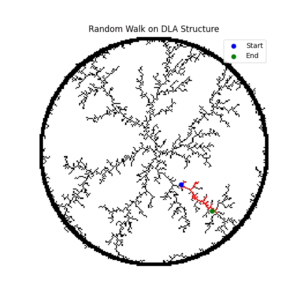
DLAっぽい図をおいておきます。

pip install numpy networkx matplotlib
グリッド上でDLAを生成して grid を返す
import numpy as np import random import time def generate_dla_structure(grid_size=200, num_particles=30000, max_steps=30000): directions = [(-1, 0), (1, 0), (0, -1), (0, 1), (-1, -1), (-1, 1), (1, -1), (1, 1)] grid = np.zeros((grid_size, grid_size), dtype=bool) center = grid_size // 2 grid[center, center] = True # 種 start_time = time.time() for i in range(num_particles): angle = np.random.uniform(0, 2*np.pi) r = grid_size // 2 - 2 x, y = int(center + r*np.cos(angle)), int(center + r*np.sin(angle)) for _ in range(max_steps): dx, dy = random.choice(directions) x, y = x + dx, y + dy if not (1 < x < grid_size-1 and 1 < y < grid_size-1): break if any(grid[x+ddx, y+ddy] for ddx, ddy in directions): grid[x, y] = True break print(f"DLA done in {time.time()-start_time:.2f} sec") return grid
grid を受け取り、networkx グラフに変換
import networkx as nx import numpy as np def build_graph_from_grid(grid): directions = [(-1, 0), (1, 0), (0, -1), (0, 1), (-1, -1), (-1, 1), (1, -1), (1, 1)] G = nx.Graph() grid_size = grid.shape[0] occupied_points = np.argwhere(grid) for x, y in occupied_points: G.add_node((x, y)) for dx, dy in directions: nx_, ny_ = x + dx, y + dy if 0 <= nx_ < grid_size and 0 <= ny_ < grid_size and grid[nx_, ny_]: G.add_edge((x, y), (nx_, ny_)) return G
G を受け取り、ランダムウォークして経路を返す
import random def random_walk_on_graph(G, num_steps=500): path = [] current = random.choice(list(G.nodes)) path.append(current) for _ in range(num_steps): neighbors = list(G.neighbors(current)) if not neighbors: break current = random.choice(neighbors) path.append(current) return path
上記を組み合わせて走らせる
from dla import generate_dla_structure from graph_utils import build_graph_from_grid from random_walk import random_walk_on_graph import matplotlib.pyplot as plt # DLA構造を作る grid = generate_dla_structure(grid_size=200, num_particles=30000, max_steps=30000) # グラフに変換 G = build_graph_from_grid(grid) # ランダムウォーク path = random_walk_on_graph(G, num_steps=1000) # 可視化 plt.imshow(grid.T, cmap="gray_r", origin="lower") xs, ys = zip(*path) plt.plot(xs, ys, color="red") plt.show()


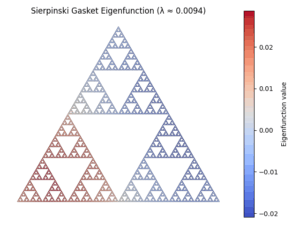
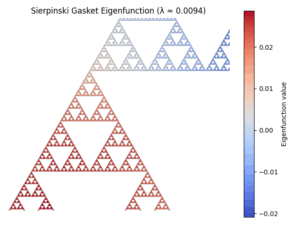
import numpy as np import networkx as nx import matplotlib.pyplot as plt import matplotlib.cm as cm import matplotlib.colors as colors from scipy.linalg import eigh from matplotlib.collections import PolyCollection def sierpinski_graph(level): G = nx.Graph() G.add_node(0, pos=(0, 0)) G.add_node(1, pos=(1, 0)) G.add_node(2, pos=(0.5, np.sqrt(3)/2)) G.add_edges_from([(0, 1), (1, 2), (2, 0)]) triangles = [(0, 1, 2)] index = 3 def subdivide(G, triangle, level): nonlocal index if level == 0: return [triangle] a, b, c = triangle ab = index bc = index + 1 ca = index + 2 index += 3 # 中点追加 G.add_node(ab, pos=((G.nodes[a]['pos'][0] + G.nodes[b]['pos'][0]) / 2, (G.nodes[a]['pos'][1] + G.nodes[b]['pos'][1]) / 2)) G.add_node(bc, pos=((G.nodes[b]['pos'][0] + G.nodes[c]['pos'][0]) / 2, (G.nodes[b]['pos'][1] + G.nodes[c]['pos'][1]) / 2)) G.add_node(ca, pos=((G.nodes[c]['pos'][0] + G.nodes[a]['pos'][0]) / 2, (G.nodes[c]['pos'][1] + G.nodes[a]['pos'][1]) / 2)) # 辺追加 G.add_edges_from([(a, ab), (ab, b), (b, bc), (bc, c), (c, ca), (ca, a)]) tris = [] tris += subdivide(G, (a, ab, ca), level - 1) tris += subdivide(G, (ab, b, bc), level - 1) tris += subdivide(G, (ca, bc, c), level - 1) return tris all_tris = [] for tri in triangles: all_tris += subdivide(G, tri, level) return G, all_tris # ------------------------------ # グラフ生成 & ラプラシアン計算 G, triangles = sierpinski_graph(level=4) L = nx.laplacian_matrix(G).astype(float).toarray() eigvals, eigvecs = eigh(L) # 固有関数の取得 eig_index = 1 # 非ゼロ最小固有値 node_vals = eigvecs[:, eig_index] pos = nx.get_node_attributes(G, 'pos') # 三角形ポリゴンと色 polys = [] colors_vals = [] for tri in triangles: pts = [pos[i] for i in tri] polys.append(pts) avg_val = np.mean([node_vals[i] for i in tri]) colors_vals.append(avg_val) # カラーマップ norm = colors.Normalize(vmin=min(colors_vals), vmax=max(colors_vals)) cmap = cm.get_cmap('coolwarm') face_colors = cmap(norm(colors_vals)) # 描画 fig, ax = plt.subplots() pc = PolyCollection(polys, facecolors=face_colors, edgecolors='k', linewidths=0.2) ax.add_collection(pc) # カラーバー sm = cm.ScalarMappable(cmap=cmap, norm=norm) sm.set_array([]) cbar = plt.colorbar(sm, ax=ax) cbar.set_label("Eigenfunction value") ax.set_aspect('equal') ax.set_title(f"Sierpinski Gasket Eigenfunction (λ ≈ {eigvals[eig_index]:.4f})") ax.autoscale() plt.axis('off') plt.tight_layout() plt.show()
[PM2](https://note.com/mega_gorilla/n/nff477d9f263d)は、Node.jsアプリケーションを本番環境で安定的に運用するための強力なツール
### React
| 用語 | 意味 |
| —————————— | ———————————— |
| `__dirname` | このファイルがあるディレクトリの絶対パス |
| `path.resolve()` | 引数を結合して絶対パスを作る |
| `path.resolve(__dirname, ‘…’)` | このファイルを基準にした絶対パスが作れる → 安定したフォルダ参照に最適 |
`next-intl.config.ts`のとき注意。
#### イベントハンドラ
ブラウザ上で発生するイベント(クリック、入力、フォーム送信など)に反応して処理を行う
– onSubmit → HTML の <form> で送信時に発火するイベント
– handleSubmit → そのイベントを処理するために書く自分の関数(名前は一応自由慣習で、handleナンチャラにする)
| イベント名 | 対象 | 発生タイミング |
| ——————————- | ———————————– | ———- |
| `onClick` | ボタン、リンク、任意要素 | クリックしたとき |
| `onChange` | `<input>`, `<select>`, `<textarea>` | 値が変わったとき |
| `onSubmit` | `<form>` | フォーム送信時 |
| `onKeyDown` / `onKeyUp` | 入力要素、任意要素 | キー押下/キー離し |
| `onMouseEnter` / `onMouseLeave` | 任意要素 | マウスが入った/出た |
### Next.js
Create-next-appの[選択肢について](https://zenn.dev/ikkik/articles/51d97ff70bd0da)
(<- | -> で Enter, 選択肢間違えたらCtrl + c) [ npx create-next-app@latest ]
npm run dev ( yarn dev )は, package.jsonの“scripts“セクションにある
`”dev”: “next dev –turbopack”`
コマンドが実行される.
多言語対応には、[i18next + react-i18next](https://qiita.com/syukan3/items/b4da93fe73cc577012cd)か[next-intl](https://zenn.dev/eju_labs/articles/6ee172b96c5f08)があるらしくて、前者(i18next)はNext.js以外にもReact、Vue、Angularでも使えるらしい。後者は、パフォーマンスとSEO的に良いらしい。
Next.jsはエラー時以外ははSSR(Server Side Rendering)するから、Reactの
> アプリがサーバレンダリングを使用している場合、createRoot() の使用はサポートされていません。代わりに hydrateRoot() を使用してください。
を常に使うっぽい。( エラーページの描画失敗以外: 例えば,
<details>
if (document.documentElement.id === '__next_error__') {
let element = reactEl;
// Server rendering failed, fall back to client-side rendering
if (process.env.NODE_ENV !== 'production') {
const { createRootLevelDevOverlayElement } = require('./components/react-dev-overlay/app/client-entry');
// Note this won't cause hydration mismatch because we are doing CSR w/o hydration
element = createRootLevelDevOverlayElement(element);
}
_client.default.createRoot(appElement, reactRootOptions).render(element);
} else {
_react.default.startTransition(()=>{
_client.default.hydrateRoot(appElement, reactEl, {
...reactRootOptions,
formState: initialFormStateData
});
});
}
// TODO-APP: Remove this logic when Float has GC built-in in development.
if (process.env.NODE_ENV !== 'production') {
const { linkGc } = require('./app-link-gc');
linkGc();
}
}
</details>
Approuterの公式チュートリアルなら, /nextjs-dashboard/node_modules/.pnpm/next@15.3.2_react-dom@19.1.0_react@19.1.0__react@19.1.0/node_modules/next/dist/client/app-index.js
Chap.6 でNeonが2日放置してたら、connect切断されてたので注意)
↓参考: [Oracleの資料](https://speakerdeck.com/oracle4engineer/ochacafe-nextjs-basics?slide=33)
| ファイル/フォルダ名 | 説明 |
|—————————-|———————————|
| `app` | App Router |
| `pages` | Pages Router |
| `public` | 静的アセット |
| `next.config.js` | Next.jsのコンフィグ |
| `package.json` | プロジェクトの依存ライブラリとスクリプト |
| `instrumentation.ts` | OpenTelemetryのインストルメント(設定値) |
| `middleware.ts` | Middlewareの記述 |
| `.env` | 環境変数 |
| `.env.local` | ローカル環境の環境変数 |
| `.env.production` | 本番環境の環境変数 |
| `.env.development` | 開発環境の環境変数 |
| `.eslintrc.json` | ESLintのコンフィグ |
| `next-env.d.ts` | TypeScriptの宣言ファイル |
| `tsconfig.json` | TypeScriptのコンフィグ |
| `jsconfig.json` | JavaScriptのコンフィグ |
### Middlewareとは
– クライアントとサーバーの間で動作
– 認証
– バリデーション
– データ整形
– セキュリティチェック
– その他(etc.)*多言語対応もココをいじる。
## tailwind の[解説サイト](https://zenn.dev/yohei_watanabe/books/c0b573713734b9/viewer/215e30)
## prisma
とりあえず、用語載ってる[サイト](https://qiita.com/takekota/items/42f6a9066de60da93161)
prisma.<モデル名>.<操作メソッド>
みたいに、.tsx内で使う。(からデータ拾ってるところ探すときはctrl + shift + Rでprisma.で調べれば気合で見つかる。)
(例:
model Plan {
id Int @id @default(autoincrement())
name String
createdAt DateTime @default(now())
}
// 全件取得
const plans = await prisma.plan.findMany();
“`prisma
datasource db {
provider = "mysql"
url = env("DATABASE_URL")
}
とルートディレクトリ直下の.envファイル(create.next.appすれば勝手に作られるかも?なかったら作成)に
DATABASE_URL="mysql://root:password@localhost:13306/HOGEHOGE
って書く。
詳しそうな[zennのサイト](https://zenn.dev/hayato94087/books/e9c2721ff22ac7/viewer/d00oygw3ghp7jdp)
クリーンアーキテクチャ
https://zenn.dev/sre_holdings/articles/a57f088e9ca07d
## ORM(databaseいじるやつ)
[Next.js × ORM 実践比較:Prisma / Drizzle / Kysely をDocker上で動かして違いを体感する](https://shinagawa-web.com/blogs/nextjs-orm-docker-hands-on)
翻訳ファイルの書くとき
JSON5(.json5 : おすすめ)を使うとコメントアウト[書ける](https://qiita.com/jkr_2255/items/026e0fdb4570c88c4f51)し[便利らしい](https://qiita.com/yokra9/items/1ac03876415d7fd47a65)
### CI/CD
– CI: 継続的インテグレーション: 変更を統合するたびに自動でビルド・テストする。
– CD: 継続的デリバリー: 開発したコードを運用環境(AWSのEC2とか)へ展開する準備を自動で完了させるための仕組み。
### Github Actions
– Github Actions: Git hubが提供するワークフロー(なにかのイベント(pushとか)をトリガーにしてジョブを実行させるもの。)
workflow → 全体の設計図
trigger (on: > push:のこと)→ いつ走るか(きっかけ)
job (jobs: > deploy: > runs-on: # 仮想マシン環境 ubuntu-latestとか)→ 作業机ごとに分けたまとまり
-> step(name: HOGE > run: npm install とか) → 作業机の上での具体的な作業
runs on だと環境しか作ってないから、
steps: # ← step
- name: コードを取得
uses: actions/checkout@v4
でコードを取得する。(@の後ろはversion。これのリポジトリは[ココ](https://github.com/actions/checkout))
定期実行を時間でやると、githubのコンピュータリソースが足りないとできないらしいでも、できなかったことが通知されないから、
`on: /n Schedule: /n -cron:”0 0 * * “`より、重要なやつはPRやPushをTriggerにしたほうが[いいらしい](https://youtu.be/RxcUrg3OO3o?t=528)
App router
Next.js 13で導入されたApp Routerは、デフォルトでReact Server Components(RSC)を使用しており、このRSCは非同期関数として動作します。これにより、データ取得をコンポーネントレベルで直接行うことが可能になりました。
具体的には、async/await構文を使用して、外部APIやデータベースからデータを取得する処理をコンポーネント内で書くことができます。これにより、クライアントサイドでのデータ取得(useEffectなど)とは異なり、サーバーでレンダリングが完了する前に必要なデータをすべて取得できるため、レンダリングブロック(render-blocking)なデータ取得を回避できます。
*App Router の layout.js や page.js は、非同期関数 async に対応するように設計されています。
git rebase -i HEAD~2
で直前のコミットと現在のコミットの変更履歴を一つに圧縮できるから便利。
git switch -c HOGEFUGA
で現在のブランチのコピーブランチ名:HOGEFUGAでつくれるけど、IDEAやVSCODEとかならGUI的にいろいろできるかも。
あと、stash, shelf とかで一時退避を使うと、reviewのためとかに別のブランチにいくとかに便利。
git mergeしようとしたときに、conflict しててIDEAで解消するときは、右がもともとのので、真ん中が解消した後の最終結果、左がmerge して取り込もうとしてるブランチのこと。
↓がgit hubのプルリクのコメントで書けるから便利かも。
<details><summary>的はずれなコメントしてたので修正</summary>
これが便利
<del>
\>で引用書ける。
```mermaid graph TD; A-->B; A-->C; B-->D; C-->D; ```
がgit で書ける。
</del>
</detail>
git reset --hard (commit番号)
↑神のコマンド。戻れなくなってきたわけわからんくなってきた個人repo.ならアリ。そうじゃない場合は。。。
スクリーンショットの保存先を指定するコマンドを実行↓
mkdir -p ~/Pictures/Screenshots
defaults write com.apple.screencapture location ~/Pictures/Screenshots
killall SystemUIServer
最後のは、システム設定の変更をすぐに反映させるために、メニューバーを再起動するコマンド。
↓スクリーンショットを日付ごとに振り分けるスクリプト
move_screenshots.sh というファイル名で作成してください。
#!/bin/bash
SRC="$HOME/Pictures/Screenshots"
BASE_DEST="$HOME/Pictures/Screenshots"
find "$SRC" -maxdepth 1 -type f -name "*.png" | while read -r file; do
DATE=$(stat -f "%Sm" -t "%Y-%m-%d" "$file")
DEST="$BASE_DEST/$DATE"
mkdir -p "$DEST"
mv "$file" "$DEST/"
echo "Moved $file to $DEST/"
done
スクリプトの使い方
ファイルを作成後、実行権限を付与します。↓
chmod +x ~/move_screenshots.sh
スクリプトを実行します。
bash ~/move_screenshots.sh
スクリーンショットが保存されるディレクトリは自由に変更可能です。
スクリプト内の SRC と BASE_DEST のパスを書き換えてください。
オーバーライドは「継承してるから使える」ではなく、「Object クラスの機能を自分流にカスタマイズする」こと。
`toString()` のオーバーライドは **継承してなくても使える**!
– なぜなら、**Javaのすべてのクラスは暗黙的に `Object` クラスを継承している**から。
toString() をオーバーライドすると System.out.println(obj); で中身をきれいに出力できるようになる!*equals()もよく使う。
import java.util.Arrays;
public class Fibonacci { static int callCount = 0; // 再帰呼び出し回数
public static void main(String[] args) { int[] memo = new int[51];
Arrays.fill(memo, -1); int result = fibonacci(memo, 50);
System.out.println("F(50) = " + result);
System.out.println("再帰呼び出し回数: " + callCount); }
//メモ化により **各nにつき再帰1回のみ** → **呼び出し回数 ≒ n回 (O(n))**
public static int fibonacci(int[] memo, int n) { callCount++;
if (n == 0) return memo[n] = 0;
if (n == 1) return memo[n] = 1;
if (memo[n] != -1) return memo[n];
return memo[n] = fibonacci(memo, n - 1) + fibonacci(memo, n - 2); }
}
# 列挙型
public enum Operation {PLUS, MINUS, MULTIPLY, DIVIDE}
をOperation.java
public class OperationSymbol {
public static void main(String[] args) {
System.out.println(Operation.PLUS.name());
System.out.println(Operation.MINUS.ordinal());
}
}
をOperationSymbol.javaで作ると、
PLUS
1
がでてくる。内部にname, ordinalのgetterがあるらしい.
貪欲法はちょっと、hash 再探索っぽい面がある気がする。
Object.equals(A,B)は、nullを考慮した比較ができる。
Hibernateのバージョン上げにも注意する。(Springboot2系から3系にしたらjavax から jakartaになってこれになりがち)